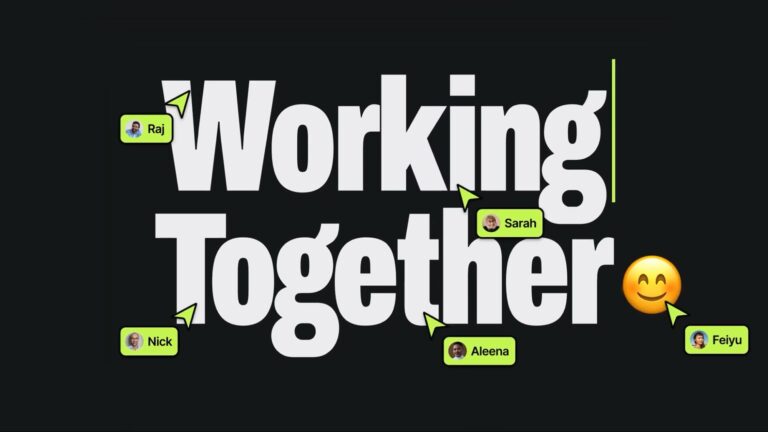
Collaborative editing is now a standard feature in design tools, where multiple users can work in parallel without conflicts. Video editing software, however, has yet to fully embrace this model. Unlike design canvases, timelines introduce unique challenges. Every edit affects not just what is visible, but also when it appears and how it fits into a sequence of time-based content.
To support real-time collaboration, a video editing system must maintain consistent, valid timelines across multiple users making concurrent edits. This requires more than shared access. It demands a sync engine capable of resolving changes predictably while respecting the temporal structure of timelines.
Don’t want to miss the best from TechLatest?
Set us as a preferred source in Google Search
and make sure you never miss our latest.
The multiplayer architecture developed for design platforms offers useful concepts that can be adapted for video. In particular, the use of atomic operations, fractional indexing, compound attributes, and grouped transactions provides a foundation for enabling consistent, low-latency collaboration in timeline-based editors.
Synchronization Is the Primary Constraint
Collaborative video editing involves several challenges, from asset synchronization and video streaming to comments and playhead positions. However, the core challenge lies in project data synchronization. When multiple users edit the same timeline, every client must reflect the same valid state. Without this consistency users may lose work.
Figma addressed this problem with atomic operations and a Last-Write-Wins (LWW) model. Each field within an object updates independently. When two users edit the same attribute, the server applies the value that reaches it last. No locks or complex synchronization algorithms are necessary. Local edits apply instantly and reliably across all clients.
This model works well for video timelines. A clip might have the following structure:
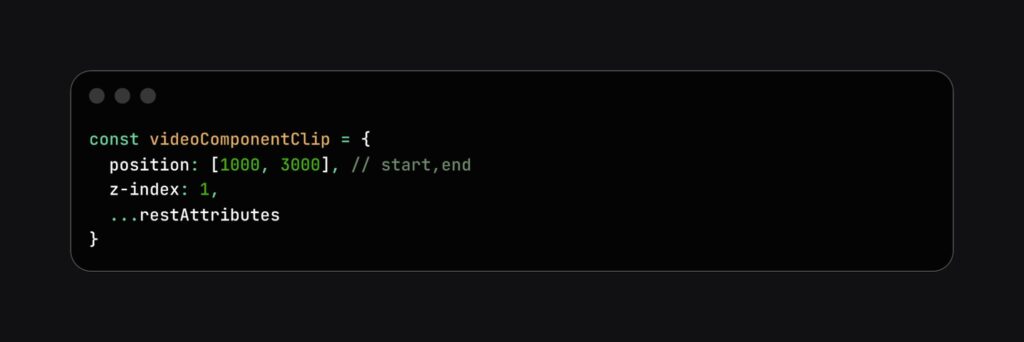
One user may move the clip to a different layer by changing its z-index, while another updates its position on the timeline. Both changes succeed without conflict. If both users edit the startTime, the system applies the version that reached the server last. The result is a consistent, conflict-free timeline.
Some systems use more complex CRDT approaches, such as Operational Transforms (OT) or vector-clock-based merge algorithms, to handle distributed changes. While powerful, these approaches introduce significant complexity that is not always necessary in video editing. In practice, a simpler CRDT pattern—Last-Writer-Wins (LWW) registers, where each attribute resolves conflicts using timestamps—provides clearer behavior and lower overhead. This makes it more suitable for systems where exact timing and responsiveness are essential.
Timelines Require Temporal Awareness
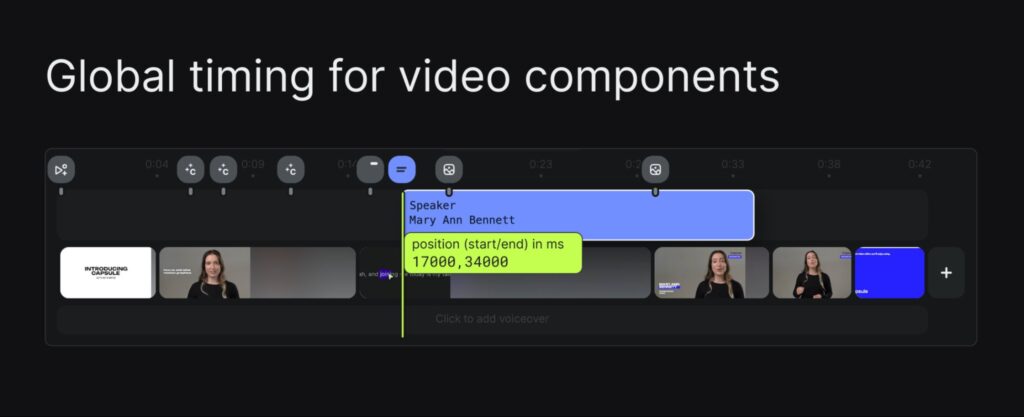
Unlike spatial design tools, where layers can shift freely, video timelines depend on strict time-based ordering. Each clip has a start and an end point. Moving one clip affects the positioning of others. Every operation must account for cascading effects.
If a user moves a clip forward by 500 milliseconds, the timeline must adjust overlapping clips and surrounding video components to prevent overlaps and collisions. Inserting a new clip may push others aside or break transitions. To avoid these problems, collaborative systems must enforce the following constraints:
- A-roll clips on the main track must not overlap
- Start and end times must remain valid and ordered
- Transitions and audio must stay synchronized
- Video components, B-roll, and audio clips should live on separate tracks, where they can overlap and use global timeline positioning
These rules must hold even during concurrent edits. The system must apply changes predictably and prevent inconsistencies from entering the timeline.
Fractional Indexing Solves Reordering Conflicts
Reordering clips is common in editing. But it introduces conflicts when two or more users attempt to insert clips into the exact location. Fixed indices like 1 and 2 lack sufficient flexibility. Frequent insertions between those values require reindexing the entire sequence, which increases complexity and latency.
Figma addressed this issue with fractional indexing. Instead of using integers, each item receives a floating-point value:
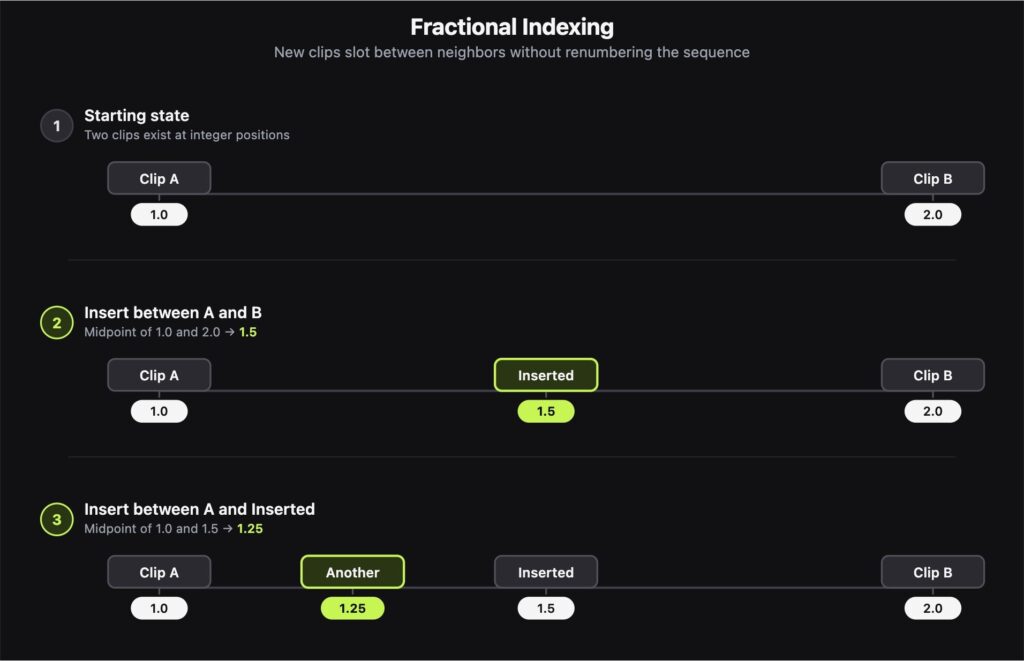
These fractional positions allow clips to be inserted locally between others without global coordination. Clients generate new positions independently. To avoid index collisions, the system can introduce a small random jitter to generated values, making conflicts extremely unlikely even under concurrency. In edge cases, timestamps or session IDs provide deterministic ordering.
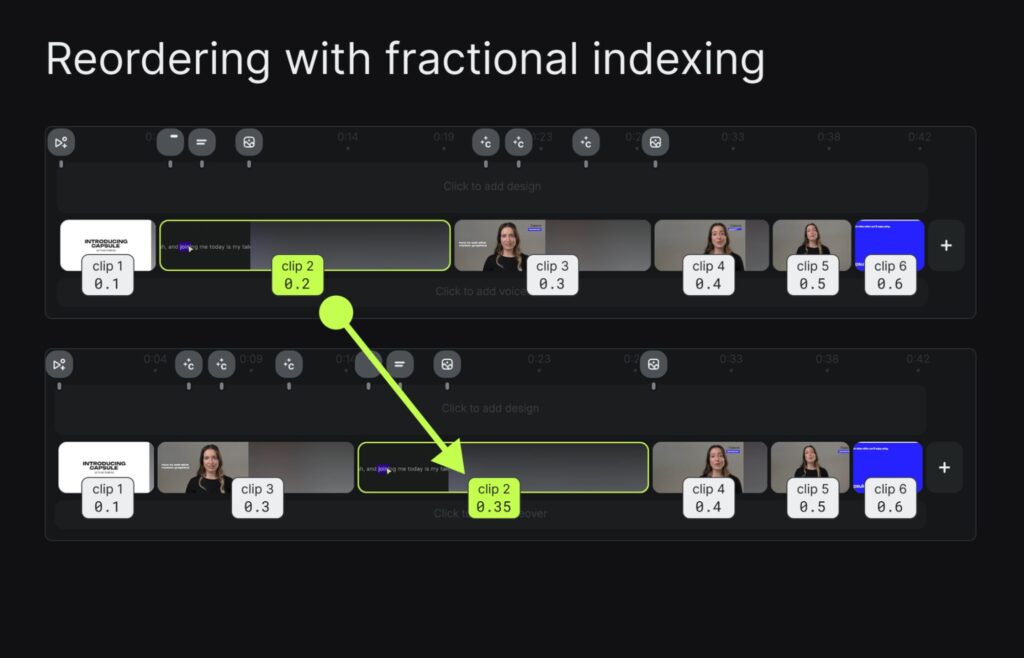
Timelines use timecodes, but they face the same issue when clips are inserted between other clips. Fractional indexing offers a way to represent position without triggering large recalculations. Edits remain fast and conflict-free. Order stays consistent across clients, even under heavy concurrency.
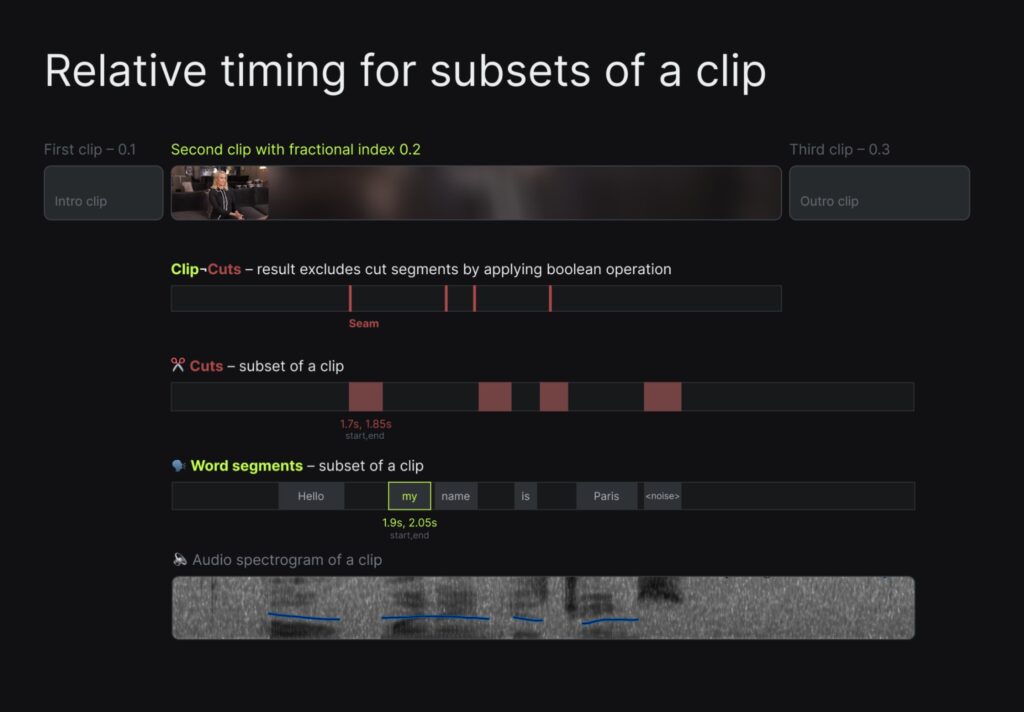
Compound Attributes Maintain Valid State
Some updates affect multiple properties that must remain consistent with one another. A clip’s duration depends on both its startTime and endTime. Updating only one of these fields could cause the clip to disappear, overlap with another, or violate timeline rules.
To avoid this, Figma uses compound attributes. Instead of sending updates to each field separately, related properties are bundled into a single attribute:
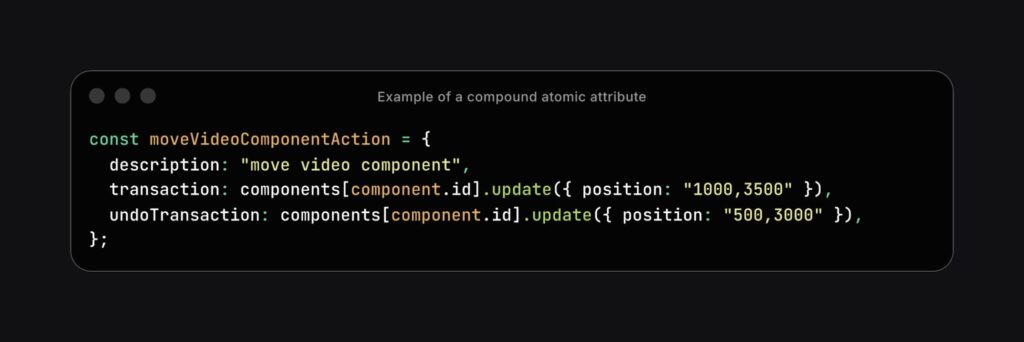
This ensures that the system either applies both values together or applies neither. There is no intermediate state where the clip exists in an invalid form.
The same pattern applies in video editing. A compound update might combine timing and transition properties:
"position": "start, end",
"transition": "fade,400"These grouped updates allow the system to apply changes atomically. Editors can make complex adjustments without worrying that the timeline will become incomplete or broken. Compound attributes help enforce timeline integrity under concurrent edits.
Grouped Transactions Support Complex Edits
Specific user actions involve multiple clips or independent attributes that cannot be updated as compound fields. Examples include splitting a clip, dragging several items to a new track, or applying transitions to a group. These actions require coordination but affect objects that are not structurally linked.
For these cases, the system should use grouped transactions. A transaction is a set of atomic operations that must succeed or fail as a whole. If any update in the transaction cannot be applied, none of the changes take effect.
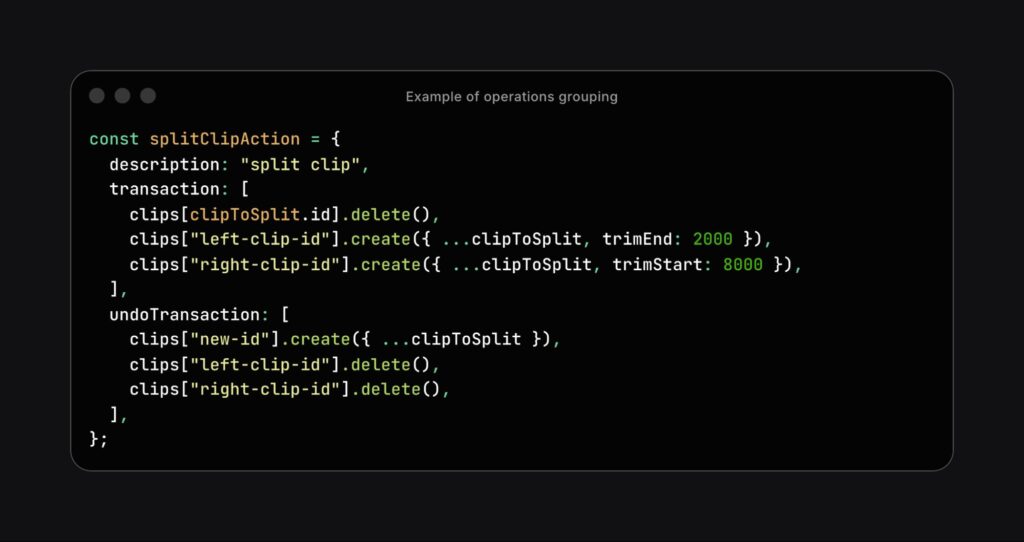
This behavior reflects user expectations. If a user moves three clips together, the operation should not partially succeed. A failure on one item should cancel the entire move. The timeline remains stable, and user intent is preserved.
Grouped transactions also improve undo and redo. Rather than tracking each minor update, the system logs the entire transaction as a single step. This makes undo behavior easier to follow and more aligned with the editor’s mental model.
Action history as context for AI
Collaborative systems generate structured logs of every change. These histories are often used for replay, versioning, or debugging. But they can also serve as input for intelligent features and workflow improvements.
With access to edit history, the system can:
- Summarize key actions in a session
- Annotate changes by user and timestamp
- Suggest edits based on repeated behavior
- Enable smart defaults for recurring patterns
- Support analytics for product design and research
For example, if a user consistently trims the start of every imported clip, the system could suggest an auto-trim function. When users return to a shared project, the interface could highlight changes made since their last session. These features depend on treating history not as a convenience but as a core signal.
Structured collaboration logs allow systems to adapt over time. Editors benefit from tools that recognize patterns and adjust the interface accordingly. The result is a more innovative, more responsive editing environment.
Applying Multiplayer Infrastructure to Timelines
Building a collaborative video timeline editor requires more than interface changes. It demands a robust system for synchronizing concurrent edits, resolving conflicts, and preserving valid state under all conditions.
The multiplayer concepts developed for design tools apply directly to this challenge. Atomic updates allow isolated changes. Last-Write-Wins resolves field-level conflicts cleanly. Fractional indexing handles dynamic reordering. Compound attributes ensure field integrity. Grouped transactions capture complex edits. Collaboration history provides a feedback loop for improvements.
Applied to video timelines, these techniques support consistent, low-latency collaboration. Editors can work in parallel without overwriting each other’s changes. The timeline stays playable. The system reflects both the structure of time-based media and the intent of its users.
This model provides more than shared access. It delivers shared execution that respects sequencing, preserves data integrity, and enables productive, collaborative workflows. These ideas form a foundation for future systems, where real-time collaboration in video editing can become as seamless and reliable as it is in modern design tools.
References:
- Capsule Video. (n.d.). Capsule: Multiplayer video editing preview. YouTube.https://www.youtube.com/watch?v=o5zCtmwTS1M
- Lockard, M. (2020, September). A pragmatic approach to live collaboration: Atomic operations. Hex.https://hex.tech/blog/a-pragmatic-approach-to-live-collaboration/#atomic-operations
- Local First. (2025, November). Live session on multiplayer collaboration. YouTube.https://youtube.com/live/fVuXngrG4Es?si=C8YILc1XH3yCpfCv&t=2424
- Wallace, E. (2017, March). Real-time editing of ordered sequences: Fractional indexing. Figma.https://www.figma.com/blog/realtime-editing-of-ordered-sequences/?fuid=1220403719361222779#fractional-indexing
- Wallace, E. (2019, October). How Figma’s multiplayer technology works. Figma.https://www.figma.com/blog/how-figmas-multiplayer-technology-works/
Enjoyed this article?
If TechLatest has helped you, consider supporting us with a one-time tip on Ko-fi. Every contribution keeps our work free and independent.
Support on Ko-fiDirectly in Your Inbox