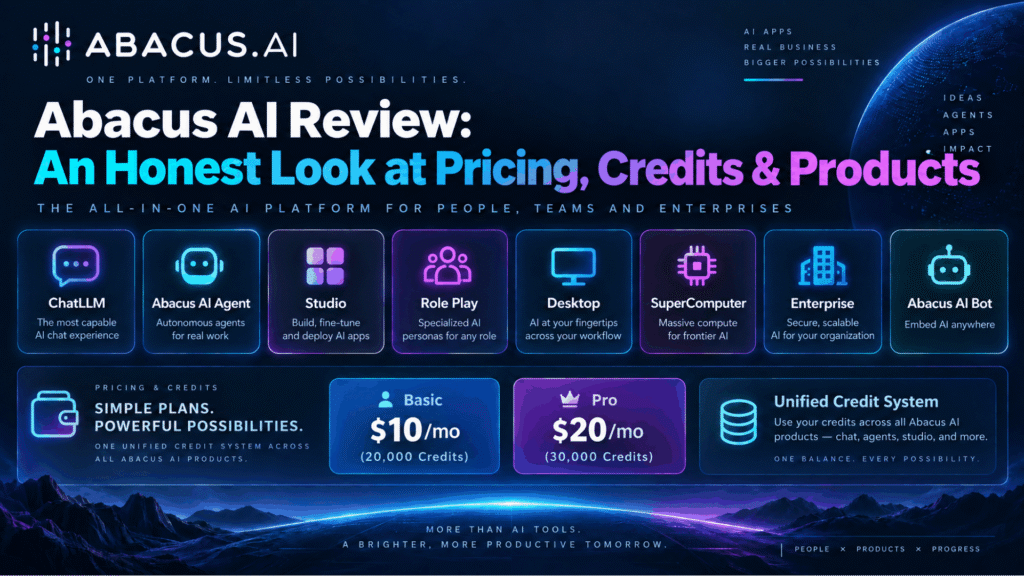
Abacus AI is an all-in-one artificial intelligence platform that combines access to popular frontier AI models, autonomous task-executing agents, a full-stack app builder, persistent cloud compute, and enterprise machine-learning infrastructure inside a single subscription starting at $10 per month.
Founded in 2019 and headquartered in San Francisco, it is used by more than 3 million professionals and serves everyone from solo builders to Fortune 500 enterprises. Its consumer platform is called ChatLLM; its autonomous agent is named Abacus AI Agent.
Don’t want to miss the best from TechLatest?
Set us as a preferred source in Google Search
and make sure you never miss our latest.
Content Table
1. What Is Abacus AI? Platform Overview
Abacus AI is one workspace that replaces several separate AI subscriptions. It bundles frontier language models, autonomous agents, creative tools and cloud infrastructure under one account and one credit balance.
Most AI apps are a window into one model family. ChatGPT gives you OpenAI. Claude gives you Anthropic. Gemini gives you Google.
Abacus AI sits above all of them. You can use an Anthropic model for reasoning, an OpenAI model for drafting, a Google model for long documents, and a fast open model for bulk work, all without paying four bills.
Model choice is only the entry point. The bigger difference is that Abacus AI executes. You describe an outcome, and an agent plans the steps, browses the web, writes and runs code, and hands back a finished app, file, or report.
Under that sits a layer most chat apps do not offer: real infrastructure. That means a persistent cloud computer, personal agents that keep running after you close your laptop, and enterprise machine learning.
Some of this sits on higher plans. The cloud computer and personal agents need Pro, and machine learning is an Enterprise service.
The honest summary: Abacus AI is less a chatbot and more an AI operating system. That breadth is its biggest strength, and it is also the root of most criticism, mainly the learning curve and credit complexity.
2. Abacus AI at a Glance
- What it is: an all-in-one AI platform for multi-model chat, autonomous agents, app building, media generation, desktop coding tools, cloud compute and enterprise AI.
- Company Location: Headquartered in San Francisco, California.
- Founders: Bindu Reddy (CEO) and Arvind Sundararajan.
- Founded: 2019, according to third-party company records. The official About page does not state a year.
- Scale: more than 3 million professionals, SMBs and enterprises, including Fortune 500 companies.
- Main app: ChatLLM, on web, iOS and Android.
- Agent: Abacus AI Agent (DeepAgent).
- Models: popular from OpenAI, Anthropic, Google, xAI, DeepSeek, Moonshot (Kimi), Zhipu (GLM), Qwen and others, plus Abacus AI’s own Smaug models.
- Paid plans: Basic at $10/month ($7 first month), Pro at $20/month, and Enterprise from $5,000.
- Free options: Abacus AI Bot is free and open source. A free Abacus AI account includes 2,000 credits with no credit card.
- Developer API: the RouteLLM API is included with the ChatLLM subscription.
- Compliance: SOC 2 Type 2 and HIPAA. Customer data is not used for training.
- Integrations: Slack, Microsoft Teams, Confluence, Google Drive, Google Calendar, Gmail, Jira, and GitHub, plus Stripe payments for apps you build.
3. Who Built Abacus AI?
Abacus AI is led by two co-founders with deep experience running AI at scale. That background explains why the product leans toward range and infrastructure rather than beginner polish.
Bindu Reddy, CEO and co-founder. She was previously General Manager for AI Verticals at AWS and, earlier, Head of Product for Google Apps. She also co-founded Post Intelligence, which Uber acquired in 2017.
Arvind Sundararajan, co-founder. He was previously a technical lead at Google, working on Gmail and AdSense, and co-founded Post Intelligence with Reddy. He later became a senior technical lead at Uber, according to public profiles.
Details to treat with care. The founding year, 2019, comes from third-party records, not the official About page. Some third-party records also list Siddartha Naidu as a co-founder, while the official About page names only Reddy and Sundararajan.
Why this matters to you: a team from AWS, Google and Uber builds for scale first. That is exactly what Abacus AI feels like, and it is why the most common complaint is the learning curve.
4. The Four-Layer Model: How Abacus AI Is Structured
Most write-ups copy Abacus AI’s long product list. A flat list does not tell you what to use when.
A more useful map: everything Abacus AI offers sits in one of four layers.
Layer 1: Interface (what you talk to)
- ChatLLM on web, iOS and Android
- Abacus AI Desktop in Chat and Listener modes
- Abacus AI Studio for images, video, and voice
- Role Play for character chats
You ask, and it answers. This layer is closest to ChatGPT or Claude.
Layer 2: Execution (what does the work)
- Abacus AI Agent and Agent Swarms
- AppLLM for full-stack apps in the browser
- Desktop CLI, Code Editor and CoWork modes
You define an outcome. The system plans, acts and returns a finished artifact.
Layer 3: Persistence (what keeps running)
- Abacus AI SuperComputer
- Personal AI Agents: Abacus Claw and Abacus Hermes
- Abacus AI Bot on your own computer
State survives after you close the browser: hosted apps, scheduled jobs and agents with memory.
Layer 4: Platform and Enterprise (what developers and companies build on)
- RouteLLM API
- Smaug open-weight models
- Enterprise AI, machine learning, governance and compliance
Why this map helps
Most “overwhelming” complaints come from meeting all four layers at once. If you know your task’s layer, you know which product to open, and you also know right away whether your plan covers it.
5. Every Abacus AI Product Explained
ChatLLM
ChatLLM is the core app. Abacus AI calls it an “AI super-assistant”.
What you get
- Top models from OpenAI, Anthropic, Google, xAI, DeepSeek, Qwen, Kimi, GLM and others in one chat window
- New models added 24 to 48 hours after release, according to the FAQ
- Document analysis for PDFs, Word, PowerPoint and images
- Data analysis and charts from CSV and Excel files
- Image generation, with video generation handled through Studio
- Text humanization in Professional, Humorous and Caring tones
- Custom instructions, Projects, web search and a Code Playground
- AI Engineer, which builds custom chatbots and agents from plain instructions
- Integrations with Slack, Teams, Confluence, Google Drive, Google Calendar and Gmail
- iOS and Android apps, both with voice
Limits to know: Very large attachments trigger rate limits. When that happens, ChatLLM switches you to a different model automatically.
RouteLLM and the RouteLLM API
RouteLLM picks the best model for each prompt. It is also available as a developer API, and the API is included in the $10 ChatLLM subscription. It is not an enterprise-only product. It routes automatically, or you can name a specific model, and it offers automatic failover and high uptime, according to the FAQ.
Each call uses credits in proportion to the cost of the model call. Closed models are billed at the provider’s advertised price, with no markup, while open models are billed at what Abacus AI calls the best available price. The models are hosted in the United States. One thing to keep in mind is that the “unlimited” ChatLLM models are not unlimited through the API.
Abacus AI Agent (DeepAgent)
This is the general-purpose agent. You give it a task, and it uses multiple models, tools and connected systems to finish it.
What it can do
- Build, deploy and share websites and apps, including vibe coding
- Run deep research and write reports
- Create presentations and documents
- Work with Google Workspace, Gmail, Jira and other accounts
- Browse sites with an operator agent to book tickets, download images or pay bills
- Schedule tasks and run workflows
- Make short videos and images through Studio
Agent Swarms: The About page describes groups of agents working together, with examples that include deep research, full-funnel marketing, and inventory management.
Plan limits: Basic gives limited use, up to 3 tasks of limited complexity, which the pricing page describes as 3 AI Agent conversations per month. Pro gives unrestricted access to a more powerful version of the agent.
The catch: Agent tasks are the fastest way to spend credits. The billing FAQ estimates that one monthly allowance covers about 25 Agent tasks.
AppLLM
AppLLM is a browser-based development agent for full-stack web apps. Describe what you want, and it builds it. No local setup is needed, and apps deploy with one click, so it suits quick prototypes and people learning vibe coding.
It is included in the $10 subscription, together with ChatLLM and Desktop. Apps you build get free hosting (database, file hosting, and app server) up to 25,000 credits a month, until traffic becomes significant.
Abacus AI Desktop
Desktop is a downloadable app for macOS, Windows and Linux. The FAQ describes five modes.
The five modes
- CLI: a terminal interface you launch with abacusai
- Code Editor: an AI code editor for building features and fixing bugs
- Chat: general chat with leading models
- Listener: real-time meeting transcription with live AI answers (macOS and Windows only)
- CoWork: autonomous knowledge work on your local files
Install the CLI
- macOS, Linux, or WSL: curl -fsSL https://static.abacus.ai/cli/install.sh | bash
- Windows PowerShell: irm https://static.abacus.ai/cli/install.ps1 | iex
What CoWork does
- Reads, writes, and organizes documents, spreadsheets, decks, images, data and code
- Splits large jobs into parallel sub-agent tasks
- Produces editable Excel files with working formulas, Word documents, PowerPoint decks and PDFs
- Handles long-running tasks without conversation timeouts, according to the FAQ
- Asks for explicit file permission and confirms before destructive actions such as deletion
Extensibility: It supports MCP integrations and agentic browser automation, along with agent rules, plus CoWork plugins and skills. An IDE extension and a Chrome extension are listed as “coming soon”.
Plan access: Basic gets limited Desktop and CoWork use, up to 3 tasks of limited complexity, while Pro gets full access to Desktop, CoWork, the Coding Agent and CLI.
Note: the same FAQ says “All 4 Modes” in one place. The five-mode description is the more detailed and more recent one.
Abacus AI Studio
Studio is a chat-style workspace for images, video and speech.
Workspace: It offers Auto, Image and Video modes, plus Rewrite Prompt, which expands rough prompts before generation. There are tabs for Featured, Images, Videos and My Generations, and it supports multilingual voice input.
Models (as listed on the Studio FAQ)
- Image: GPT Image 1.5 and 2, Nano Banana 2 and Pro, Seedream 4.5, Midjourney, Grok Imagine Image, FLUX.2 Pro, Imagen 4, Ideogram 3.0, Recraft SVG and more
- Video: Sora 2, Veo 3.1, Kling AI v3, Seedance 2.0, Hailuo 2, Luma Labs, Grok Imagine Video and more
- Speech: ElevenLabs, OpenAI and Hume, with 10 voice profiles and lip-sync
Editing and upscaling
- Image editing with GPT Image Edit and Qwen Image Edit
- Vector output with Recraft SVG in Engraving, Line Art, Linocut and Stamp styles
- Magnific image upscaler with 9 style presets, from 2x up to 16x
- Topaz video upscaler at 2x or 4x, with a target FPS setting
- Motion Control with reference videos up to 30 seconds
Output options (model dependent)
Credits: Studio shows the credit cost before you generate. Higher resolution, longer clips and upscaling all cost more, and at zero credits, new generations are blocked.
Plan access: Basic gives 3 conversations, with a cap of 2,500 credits per conversation. Pro is unrestricted while you have active credits.
Commercial use: The billing FAQ says there are no restrictions on commercial use of generated images, but the Studio FAQ says commercial rights depend on each model’s license. Check the model license before you use output in paid campaigns.
Role Play
Role Play is for story-driven chats with AI characters. It is included with ChatLLM at $10, with nothing extra to buy, and it comes with a gallery of ready-made characters across fantasy, sci-fi, anime, history and mythology.
You can create unlimited custom characters with a name, description, personality, voice, opening scene and avatar. Custom avatars can be PNG, JPEG, GIF or WebP, up to 5 MB. Each conversation has memory, and you can regenerate replies, use text-to-speech voices and add scene images. Messages are unlimited. Everything is private by default, and character sharing is not supported yet. Abacus AI content and safety policies still apply.
SuperComputer
SuperComputer is a persistent cloud environment. Abacus AI compares it to AWS-style infrastructure without the setup work.
What it includes
- Databases and APIs you can host and call
- An always-on server for apps, agents, scripts and background jobs
- Inbound HTTPS connectivity and public URLs
- S3-style storage for files and datasets
- A terminal with root permissions, plus SSH access
- Browser and file-system access
- A GitHub connection for existing repos
- The built-in Abacus AI CLI Agent
Specs: It runs Ubuntu Linux with 2 vCPU, 8 GB RAM and persistent disk storage.
Good uses: It suits cron jobs and scheduled data pipelines, machine learning with TensorFlow, PyTorch or scikit-learn, and hosting open-source apps, your own LLM assistant, personal agents and repos.
No coding needed: You can ask for tasks in plain language, such as “deploy this app” or “create a database”. Developers still get full terminal and SSH control.
Plan and billing: SuperComputer is Pro only and costs 1 credit per 5 minutes while it runs. It shuts down automatically when nothing is running, according to the billing FAQ. Agent and CLI usage inside SuperComputer is billed separately.
Security: It uses SOC 2 compliant infrastructure and gives you a dedicated, isolated instance that is not shared with other users. Data is encrypted at rest and in transit.
Personal AI Agents: Abacus Claw and Abacus Hermes
Personal AI Agents run 24/7 in Abacus AI’s cloud and keep working while you are offline. Both are included on Pro, and you can run both at the same time.
Abacus Claw: This is a cloud-hosted version of OpenClaw, the open-source agent framework. It works on WhatsApp, Telegram, Slack and more, all at once, and you can set a custom name, tone and persona. It keeps persistent memory across conversations, comes with pre-configured models and needs no setup, and it deploys in under a minute.
Abacus Hermes: This is a self-evolving agent for complex, multi-step tasks. It builds persistent memory across sessions and saves successful strategies as reusable skills, which suits research synthesis, multi-step workflows and coordination tasks.
Which to pick: Choose Claw for an always-available assistant on your messaging apps. Choose Hermes for autonomous work that needs planning and memory.
Billing: Credits are used only while an agent is active. Claw hosting costs 1 credit per 5 minutes while its computer is on, with model calls billed separately, while Hermes uses credits for both compute and model calls. You can bring your own API key, and with Claw you simply paste the key in the chat.
Data: Conversations and configurations are encrypted. Abacus AI says it does not sell or share this data, and data can be deleted on request.
Abacus AI Bot (free and open source)
Abacus AI Bot is a free, open-source personal agent that runs on your own computer.
What it does: It is a desktop app for macOS, Windows and Linux, and you chat with it through WhatsApp, Telegram or Discord, with Slack and Gmail also supported. It has persistent memory and works with popular models or your own keys, including free OpenRouter and Google AI Studio keys. It includes coding agents, such as a bug fixer or a PR reviewer, and personal bots, such as a chief of staff, a research scout or a morning briefing, which can run on schedules. It also supports popular connectors, plus MCP.
What you need: You need a free Abacus AI account, which comes with 2,000 free credits and needs no card, and a computer that stays on and online.
Data: Logs are stored on Abacus AI servers, while API keys stay on your machine. Data is not used for training.
Bot vs Claw: The Bot is free but only works while your computer is on. Claw needs Pro plus hosting credits, but runs in the cloud 24/7.
Smaug Models
Smaug is Abacus AI’s family of open-weight models. They are available through the RouteLLM API and on Hugging Face.
- Smaug Flash: built on DeepSeek V4 Flash 0731. It scores 77.4 on LiveBench, against 74.2 for the base model and 76.0 for Claude Sonnet 5, plus 61.1 on agentic coding.
- Smaug Mini: built on Qwen3.8 27B. It is multimodal and scores 76.9 on LiveBench.
- Smaug Agentic: built on Kimi K3. It scores 79.5 on LiveBench and 94.1 on GPQA Diamond.
- All scores are self-reported by Abacus AI.
Enterprise
Enterprise runs on custom contracts starting from $5,000. It covers custom AI agents and chatbots on company data, and classic ML for forecasting, anomaly detection, lead scoring, churn prediction, fraud detection and personalisation. It comes with SOC 2 Type 2 and HIPAA compliance, and you can reach the team through sales@abacus.ai or support@abacus.ai. Public pages say little about SSO, role controls or data residency, so confirm these with sales.
6. What Can You Actually Do With It?
Feature lists are easy to skim past. Here is the same platform organised by who you are.
Founders and solo operators
- Build an MVP with AppLLM or the Agent, then host it free up to 25,000 credits a month
- Run Claw on WhatsApp as an always-on assistant
- Use Agent Swarms for research and marketing plans
Developers
- Use the Desktop CLI or Code Editor for coding and bug fixes
- Call many model families through the RouteLLM API on the $10 plan
- Host services, databases and cron jobs on SuperComputer
- Test the Smaug open-weight models through the API or Hugging Face
Analysts and researchers
- Upload CSV or Excel files for charts and analysis
- Run deep research reports with the Agent
- Use Hermes for recurring research that builds on past work
Marketing and content teams
- Create images, short videos and voiceovers in Studio
- Humanize text in three tones
- Turn meeting notes into decks with CoWork
Operations and admin
- Let CoWork organise folders and turn invoices into expense sheets
- Use Listener to transcribe meetings and answer questions live
- Schedule reports and workflows with the Agent
Enterprise teams
- Build chatbots on Confluence, Google Drive and Slack data
- Run ML models for forecasting and fraud detection
- Rely on SOC 2 Type 2 and HIPAA compliance
Budget users: Start with the free Abacus AI Bot and free OpenRouter or Google AI Studio keys.
7. Abacus AI Pricing in 2026 (Latest)
Abacus AI has two self-serve plans and a custom Enterprise tier. Prices are in US dollars, per user, per month. Always confirm current prices on the official pricing page.
Basic: $10 per month
- $7 for the first month, with 14,000 credits in that promo month
- 20,000 credits per month after that
- ChatLLM with top LLMs and image and video generators
- AppLLM, the RouteLLM API and Role Play
- Abacus AI Agent, Desktop and CoWork: limited use, up to 3 tasks of limited complexity per month
- Studio: up to 3 conversations, capped at 2,500 credits each
- No SuperComputer
Pro: $20 per month
- Everything in Basic, plus 10,000 extra credits, for 30,000 per month
- Unrestricted Abacus AI Agent, in a more powerful version, for complex tasks
- Unrestricted Coding Agent and CLI, Desktop and CoWork
- Unrestricted Studio while you have active credits
- Listener
- SuperComputer (Pro and above only)
- Personal AI Agents: Abacus Claw and Abacus Hermes
- Stronger models
Enterprise: from $5,000
- Custom pricing through sales@abacus.ai or support@abacus.ai
- Custom AI over company systems, enterprise machine learning, governance and support
Is Abacus AI free?
The main platform (ChatLLM, Agent, Studio) has no free plan. The cheapest paid entry is $7 for the first month of Basic. Abacus AI Bot is free and open source and runs on your own computer, and a free Abacus AI account includes 2,000 credits and needs no credit card. The Bot also works with your own keys, including free model tiers from OpenRouter or Google AI Studio.
What about a “Max” plan?
Some third-party sites list a $100 “Max” plan with 120,000 credits. It is not on the official pricing page as of 24 September 2026, so treat it as unverified until Abacus AI lists it.
Team billing
There is no limit on team size. Each new member is billed immediately at $10 per user per month, and the team owner pays while invited members are not charged.
The line that matters most
It is the agent limit, not the price. Basic caps the Agent, Desktop and CoWork at 3 limited tasks a month. If agents are your reason for signing up, budget for Pro.
8. How Abacus AI Credits Really Work?
Most confusion and most negative reviews start here.
A credit is not a token
Credits are Abacus AI’s internal usage unit. Chat, agents, media, API calls and compute all draw from one balance. Per-model credit rates are not published in advance, so you see the cost after use. Studio is the exception, as it shows the cost before you generate.
What a monthly allowance buys (official billing FAQ)
- Up to about 15 million input tokens on expensive models
- Up to about 70 million input tokens on other models
- Roughly 500 images
- Roughly 25 Abacus AI Agent tasks
The pattern is simple. Chat goes a long way. Agents and media are where credits go. Twenty-five agent tasks is about one per working day.
The unlimited models
The billing FAQ lists these as unlimited in ChatLLM:
- RouteLLM
- GPT-5.4 Mini
- Gemini 3.5 Flash Lite
- GLM 5.3 and GLM 5.3 Flash
- DeepSeek V4.1 Flash, DeepSeek V4 Flash and DeepSeek V4 Pro
- Kimi K2.7 Code
- Muse Spark 1.3
- Xiaomi MiMo V2.6 Pro
Two caveats most guides get wrong. First, these models still accrue credits. “Unlimited” means you can keep using them after you reach your limit. Second, they are unlimited in ChatLLM only, not through the RouteLLM API.
Tip: send routine work such as summaries, formatting and first drafts to these models. Save your allowance for frontier reasoning and agent tasks.
The 75% rule
The last 25% of your monthly allowance becomes usable in the final week of your billing cycle. Abacus AI confirms this in its billing FAQ, and the stated aim is to spread usage across the month. On Basic, about 15,000 of 20,000 credits are open in the first three weeks, and on Pro, about 22,500 of 30,000. If you hit the limit on day 12, you either wait or buy more credits.
Rollover
Monthly plan credits reset on your renewal date, while purchased credits roll over to the next month. If you end every month with thousands of unused Pro credits, Basic plus top-ups may cost less.
SuperComputer cost maths
At 1 credit per 5 minutes while running:
- 1 hour: 12 credits
- 8-hour day: 96 credits
- 24 hours: 288 credits
- 30 days non-stop: about 8,640 credits
That 30-day figure is about 29% of Pro’s 30,000 credits, before anything else. Auto-shutdown helps when nothing is running. Agent or CLI work inside the SuperComputer is billed on top.
Abacus Claw hosting uses the same rate while its computer is on, so the same maths applies. LLM calls are extra.
Free app hosting
Apps you build get a free hosting tier for database, file hosting and app server. It covers up to 25,000 credits of hosting per month and lasts until the app gets significant traffic.
Where to track spend
Open “View Credit Usage” for the full log. Turn on the toggle that shows credits per message, and use “Group by Source” to separate API spend.
Three rough burn profiles (our estimates, not official)
- Light: chat and document Q&A. Basic is usually plenty.
- Power: daily chat, weekly agent runs and some images. Pro fits.
- Builder: daily agent runs, deployments, and a SuperComputer or Claw running long hours. Expect to buy extra credits.
9. Honest Limitations
Abacus AI brings a lot of functionality into one platform, but that breadth also means there are a few things worth understanding before making it part of your regular workflow.
There is a learning curve
With ChatLLM, DeepAgent, Studio, Personal Agents, SuperComputer and other tools available from the same ecosystem, it can take some time to understand where each feature fits.
Users looking for a simple chat experience may find more focused AI tools easier to get started with. Abacus AI makes more sense once you become familiar with the different workflows and capabilities.
The credit system takes some getting used to
The platform uses credits across different models and services, and the amount consumed can vary depending on what you are doing. A quick chat and a more demanding agent or development task don’t necessarily have the same cost.
It is worth checking the current credit rates and plan allowances before running particularly large or long-running tasks. The monthly credit limits and billing rules can also affect how you plan your usage.
AI-generated work still benefits from human review
One of the useful aspects of agentic AI is that it can move beyond simply answering questions and actually carry out tasks. At the same time, that makes reviewing the output more important.
For example, generated code should be checked before being deployed, research should be reviewed for accuracy and citations, and tasks involving production systems, payments or sensitive information should have appropriate approval steps.
Longer tasks can require some supervision
Multi-step AI tasks don’t always produce a perfect result from beginning to end. Longer workflows can occasionally need clarification, correction or a narrower instruction.
In practice, breaking a large project into smaller, clearly defined tasks can make the results easier to review and manage.
The experience can vary by feature
Not every part of the platform works in exactly the same way. Some features have specific device, operating-system or connectivity requirements, while others may still be under development.
That means it is worth checking the current documentation if a particular feature is important to your workflow.
Breadth comes with a trade-off
The biggest advantage of having many AI capabilities in one place is also one of its trade-offs. Abacus AI gives you access to a broad collection of models and tools without requiring a separate service for every task.
However, someone who spends most of their time on one specific activity may still prefer a specialized product built primarily around that use case.
Check the current billing and refund terms
As with any subscription-based AI platform, it is worth understanding the billing, credit and refund policies before purchasing.
AI output can vary from task to task, and the platform’s billing terms should be considered separately from the quality of any individual result.
The overall picture
These limitations don’t necessarily make Abacus AI unsuitable. They mainly reflect the trade-off of using a platform that tries to cover a wide range of AI workflows in one place.
For someone who wants a simple chatbot and nothing more, that breadth may be unnecessary. For users who want to combine chat, research, coding, agents, automation and other AI workflows, the same breadth can be the main reason to use the platform.
10. Abacus AI vs ChatGPT vs Claude
The comparison most people want, kept fair.
Abacus AI
Its core identity is an AI operating system across many model labs. Its strengths are agents that deliver finished work, app hosting, a persistent cloud computer, a multi-model creative studio and personal agents. Its weaknesses are a steep learning curve and metered, credit-based costs. The entry price is $10 a month.
ChatGPT
Its core identity is a polished workspace for OpenAI’s models. Its strengths are ease of use and a refined everyday experience, and its weakness is that it covers one model family.
Claude
Its core identity is Anthropic’s reasoning and writing specialist. Its strengths are long-document work, careful writing and code reasoning, and its weakness is that it covers one model family.
How to choose
- Choose ChatGPT if you want the smoothest single-vendor experience and do not need model variety.
- Choose Claude if your work is mostly long documents, technical writing or code reasoning.
- Choose Abacus AI if you want agents that produce finished work, several model families in one place, hosting and compute, or one bill instead of several.
The consolidation maths (typical list prices, check current rates)
- ChatGPT Plus, Claude Pro and a Gemini paid plan: about $60 a month
- Add a dedicated coding assistant: about $80
- Add an image or video tool: about $100 or more
- Abacus AI Pro: $20, plus any extra credits you buy
The fair caveat: those tools are deeper in their own niches and usually flat-rate. Abacus AI is broader and metered.
If you use three or more AI tools, the maths favours Abacus AI. If you live in one tool, staying put may suit you better.
11. Who Should and Should Not Use Abacus AI
Strong fit
- You pay for three or more AI subscriptions today
- You want AI that produces finished work, not just answers
- You are a founder, developer, analyst or operator with varied tasks
- You need persistent infrastructure: hosted apps, scheduled agents or long jobs
- You want model choice instead of one lab
- You are happy to spend a few hours learning a broad tool
Poor fit
- You want one simple chatbot and nothing more
- You need strictly predictable monthly costs
- You want a tool that is intuitive from the first minute
- You need a published per-model price list before you start
- You depend on the single best tool in one niche
- Fast support is a hard requirement
The honest summary: Abacus AI rewards people with varied AI needs who invest time to learn it. It frustrates people who want simplicity and fixed costs. Both experiences are real.
12. Security, Privacy and Compliance
Key points for anyone evaluating Abacus AI for a business.
What Abacus AI states officially
- Customer data is not used to train models.
- Data is encrypted at all times.
- The platform holds SOC 2 Type 2 and HIPAA compliance.
- Each SuperComputer is a dedicated, isolated instance, encrypted at rest and in transit.
- CoWork needs explicit file permission and confirms destructive actions first.
- Personal AI Agent data is encrypted, never sold and deletable.
- With Abacus AI Bot, keys and credentials stay on your machine, while transcripts and logs are stored on Abacus AI servers.
Questions to ask before you buy for a team
- The exact scope of the SOC 2 and HIPAA coverage
- Data retention periods and the deletion process
- How data is handled when routed to third-party model providers
- What agents can access in connected systems
- How integration credentials are stored
- Regional data residency, if you need it
- Incident response and escalation paths
One structural caution: an agent with access to your Slack, email, repositories and drive has a wider reach than a chatbot. Give each integration the minimum permissions it needs, and require approval for consequential actions.
13. How to Get Started With Abacus AI
A path that avoids the learning-curve trap most new users hit.
- Pick your starting point. Chat and light testing: Basic at $7. Real agent work: Pro at $20. Zero budget: the free Abacus AI Bot.
- Start with chat only. Ask the same question to three different models. It teaches the interface fast.
- Turn on the per-message credit display. You will learn your burn rate from day one.
- Use the unlimited models for routine work. Keep your allowance for harder tasks.
- Spend Basic’s 3 agent tasks on real work. Scope each one tightly. The results tell you whether Pro is worth it.
- Try the Desktop CLI if you code.
- macOS or Linux: curl -fsSL https://static.abacus.ai/cli/install.sh | bash
- Windows: irm https://static.abacus.ai/cli/install.ps1 | iex
- Then type abacusai.
- Connect one integration first. Slack, Drive or GitHub. Build one working flow before adding more.
- Watch a full billing cycle. Then upgrade, or buy top-ups, based on evidence.
14. Frequently Asked Questions
What is Abacus AI?
Abacus AI is an all-in-one AI platform from Abacus.AI in San Francisco. It combines popular AI models, autonomous agents, an app builder, a creative studio and cloud compute in one account, with paid plans from $10 a month.
What is Abacus AI used for?
Abacus AI is used for multi-model AI chat, autonomous tasks, building and deploying apps, deep research, data analysis, coding, image and video generation, meeting transcription, workflow automation, always-on personal agents and enterprise machine learning.
Is Abacus AI free?
Partly. Abacus AI Bot is free and open source, and a free Abacus AI account includes 2,000 credits with no credit card. The main platform is paid, from $10 a month, with a $7 first month.
How much does Abacus AI cost?
Basic costs $10 per user per month and Pro costs $20. Enterprise starts at $5,000. New users can get their first month of Basic for $7.
Is there an Abacus AI Max plan?
Not on the official pricing page as of 24 September 2026. Some third-party sites mention a $100 Max plan, but Abacus AI does not list it.
What is ChatLLM?
ChatLLM is Abacus AI’s AI super-assistant. It gives you top models from OpenAI, Anthropic, Google and others in one app, with document analysis, image generation, web search and mobile apps.
What are Abacus AI credits?
Credits are Abacus AI’s internal usage unit, shared across chat, agents, media, API calls and compute. They are not tokens. Chat uses few credits, while agent tasks and video use many.
Do Abacus AI credits roll over?
Monthly plan credits reset on your renewal date. Credits you purchase separately roll over to the next month.
What is the Abacus AI 75% rule?
The last 25% of your monthly credits only becomes usable in the final week of your billing cycle. Abacus AI says the aim is to spread usage across the month.
Which Abacus AI models are unlimited?
The billing FAQ lists RouteLLM, GPT-5.4 Mini, Gemini 3.5 Flash Lite, GLM 5.3, GLM 5.3 Flash, DeepSeek V4.1 Flash, DeepSeek V4 Flash, DeepSeek V4 Pro, Kimi K2.7 Code, Muse Spark 1.3 and Xiaomi MiMo V2.6 Pro.
They still accrue credits, but you can keep using them after your limit. They are unlimited in ChatLLM, not through the API.
Does Abacus AI have an API?
Yes. The RouteLLM API is included with the ChatLLM subscription. It is billed in credits at each model’s price, with no markup on closed models according to Abacus AI.
What is the Abacus AI SuperComputer?
It is an always-on Ubuntu cloud computer with 2 vCPU, 8 GB RAM and persistent storage. It is available on Pro and above and costs 1 credit per 5 minutes while running.
What is Abacus Claw?
Abacus Claw is a cloud-hosted version of the open-source OpenClaw agent. It runs 24/7 on WhatsApp, Telegram, Slack and more, with persistent memory. It is part of the Pro plan.
What is Abacus AI Bot?
Abacus AI Bot is a free, open-source assistant that runs on your computer. You chat with it through WhatsApp, Telegram or Discord, and it can code, research and run scheduled tasks.
What are Smaug models?
Smaug models are Abacus AI’s own open-weight models, fine-tuned for agentic work. They are available through the RouteLLM API and on Hugging Face. Benchmark scores are self-reported.
Does Abacus AI have a mobile app?
Yes. ChatLLM has iPhone and Android apps, including voice.
Is Abacus AI secure?
Abacus AI states that data is encrypted, not used for training, and covered by SOC 2 Type 2 and HIPAA compliance. Businesses should still confirm scope and retention details before rollout.
Who owns Abacus AI?
Abacus AI is a private company based in San Francisco, led by CEO Bindu Reddy and co-founder Arvind Sundararajan.
Is Abacus AI better than ChatGPT?
It depends on your needs. ChatGPT is more polished and flat-rate. Abacus AI offers more models, agents, hosting and compute at a lower entry price, with a steeper learning curve and less predictable costs.
Is Abacus AI worth it?
If you pay for three or more AI tools, or want agents that deliver finished work, Pro at $20 a month is strong value. If you want one simple chatbot, a dedicated app may suit you better.
15. Abacus AI Review: Our Verdict
Abacus AI packs more capability into consumer pricing than any other AI platform we know of. For $20 a month you get many frontier models, an agent that builds and deploys apps, a cloud computer, a creative studio, desktop tools and personal agents.
The trade-offs are just as real. The learning curve is steep. Credits are hard to forecast. Official pages do not always agree. And specialist tools are more polished in their niches.
The decision comes down to one question: how many different things do you need AI to do?
- One thing, done extremely well: buy the specialist.
- Many things: Abacus AI’s consolidation is hard to beat.
- No budget yet: start with the free Abacus AI Bot.
Recommended path
- Start on Basic at $7 to learn the interface.
- Move to Pro as soon as you want the agent for real work.
- Use the unlimited models for routine tasks from day one.
- Watch one full billing cycle before buying extra credits.
Enjoyed this article?
If TechLatest has helped you, consider supporting us with a one-time tip on Ko-fi. Every contribution keeps our work free and independent.
Support on Ko-fiDirectly in Your Inbox