Most millennials are aware of the 3-2-1 backup rule. I know I heartily followed it. But that was the past. When it comes to the new era, the definition of backup has changed. Life has fully moved to digital now, and the photos and videos no longer live in the neat way that rule assumes. Everything is scattered across phone galleries, cloud drives, and social platforms.
I used to follow the classic rule with discipline: the original file in one place and two copies of it on an external hard drive and in cloud storage. But with time I made and consumed more content, and then eventually stopped trying to force this into the traditional backup model.
Don’t want to miss the best from TechLatest?
Set us as a preferred source in Google Search
and make sure you never miss our latest.
I built a new system around it. I defined where my content actually lives and what each surviving copy is useful for. I’ve modified the classic 3-2-1 rule into three different categories.
The 3-2-1 rule assumes an original I don’t really have anymore
The backup rule was written for a different kind of file

The internet is flooded with the original 3-2-1 backup rule—three copies, two different storage media, and one offsite copy. It’s been there for ages, and it is one of the best backup rules but not applicable to everything today.
The concept of photos and videos has evolved a lot over time. Today, we shoot photos/videos, edit them, and then keep them only on our phones (and cloud drive) or instantly upload them to social media sites like Instagram and TikTok.
The classic rule assumes the local file as a ground truth and others as a copy. But that’s not the case for today. After shooting a video, we trim it, crop it, compress it, and then upload it. And most of the time, once the file is uploaded, we often delete it from our gallery. It’s a similar case with photos; they might exist in the phone gallery and cloud, but the edited version lives only in a post.
From here the assumption drifts from the classic rule to a more modified version. The concept of copying the original files has changed to copying the original memory. Today we value memory more than files.
For instance, a few months ago, I, along with my friends, went on a 3-4 day trip to do trekking, rafting, and camping. We collectively clicked 100s of photos and videos. But did we keep all of them? No. We chose the best ones and uploaded them to Instagram. So, when we look back, we don’t go through all those 100s of photos and videos, but the Instagram posts and maybe a few featured ones from the gallery.
This slowly becomes a trap that you never notice: assuming something is backed up simply because you remember seeing it somewhere else. You live risk-free, thinking that if a video is deleted from your phone, you can easily get it from the cloud you uploaded. But the copy is living on someone else’s infrastructure, and it might later disappear or be altered.
The problem is simply that “it’s somewhere” isn’t the same thing as having a reliable backup. I still follow the 3-2-1 backup rule for my other important files, but when it comes to regular photo-video memories, I stopped trying to force my media into the traditional “master copy + backups” model. My earlier mindset changed from “which one is the backup?” to “what role does each surviving copy actually play?”
My version: one live copy, one offline copy, one recovery net
The third copy isn’t a backup at all
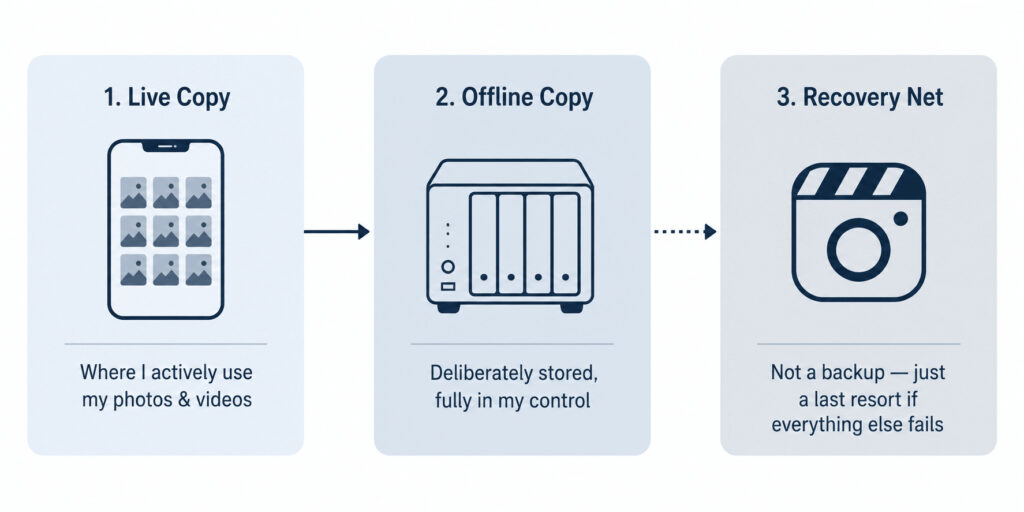
I drifted from the classic backup rule to my own version. My media files are distributed in three categories — live copy, offline copy, and recovery net. None of these contain the same files copied three times; they are different versions of the same memories. And each has a different job than the others.
Live copies are the photos and videos that live on my phone gallery or cloud storage, which I actively use. It is convenient to browse, search, and use across all my devices. It isn’t an actual backup per se but a working copy of my photos and videos. These are what I regularly interact with.
Offline copies are those memories that I deliberately stored on a separate infrastructure that I control. In my case, it is a NAS mounted on my home Debian server or an external hard drive. These are something I don’t want to upload to a social platform or leave only on my phone. For example, a wedding album with all raw photos and videos. Those are too valuable to delete and too private to post publicly.
Finally, the last layer is the recovery net; it is mostly a social media platform. I don’t treat it explicitly as a backup but as a recovery medium I know is there when I need it. This is the overlooked one that people usually have but never think about.
A video posted on Instagram as a reel doesn’t become reliable storage just because it’s still sitting there. But if the original version from the live or offline copy disappears, that posted version can still be better than having nothing.
This hasn’t happened to me yet, fingers-crossed, and normally, you should never need the recovery net. But if the unfortunate happens, say your phone gets wiped, this is where the third recovery layer suddenly matters.
What I actually do when the only copy left is the one I posted
The one time the “backup” I never meant to have saved something
Now, the important question is what happens when you are left with only the third copy, the recovery layer on a social platform. You might have accidentally deleted an old video, or your phone might have been wiped for any reason. Then it becomes the moment when the “recovery net” stops being theoretical. As I already mentioned, the social-media copy isn’t a good backup, but it’s still better than having no copy at all.
I am not going to bore you with generic recovery guides, but I will walk you through what I do in such cases. There are two different methods I follow when it comes to Instagram. I am talking about Instagram, because it is the most common one out there, but similar methods can be followed on other platforms as well.
The first choice is to follow Instagram’s own data-export mechanism. It is an official method that is applicable to most accounts. You can go to Profile -> Three-line menu -> Accounts Center -> Your information and permissions -> Export your information. It’s a comprehensive archive of your personal content, activity history, and account settings. And the personal content includes posts, photos, reels, and videos.
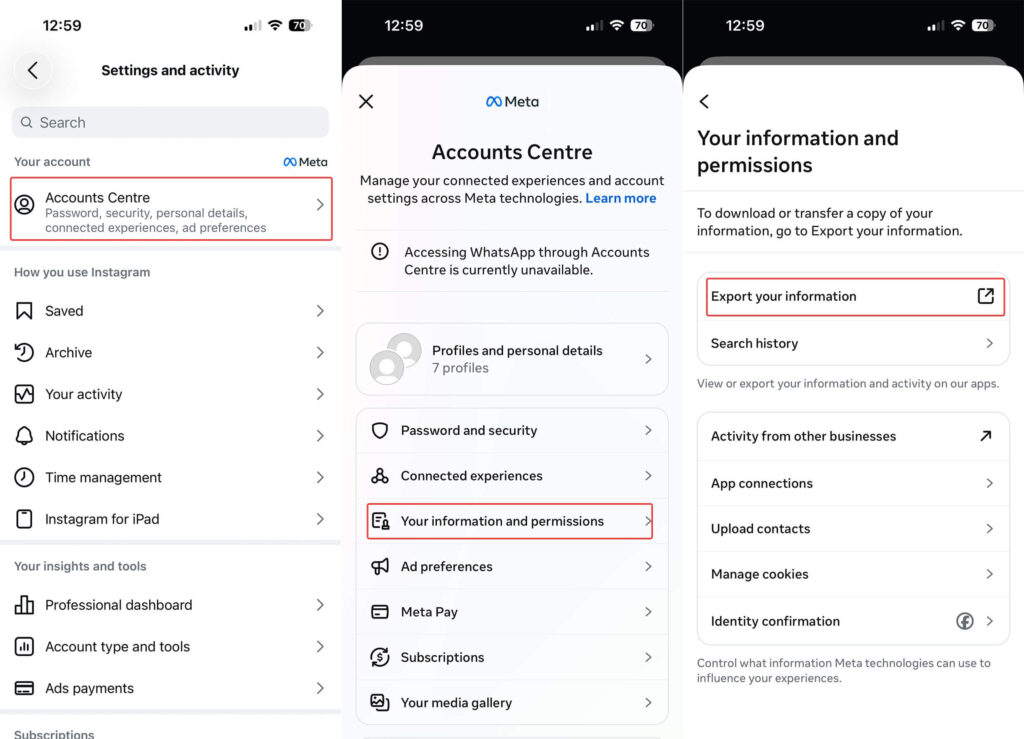
It only makes sense when you are trying to get a broader archive or need multiple pieces of content — for anything narrower, it’s not practical. The problem is when you don’t want an entire account archive. The official archive isn’t always instant. It may vary from a few minutes to a few hours depending on the activity and the number of posts on the account. For a single forgotten video, that can feel disproportionate to the problem.
This is where my second method of recovery takes place — I use an Instagram video download free tool. And you don’t have to reach the same one I do; believe me, there are a ton on the internet, and most of them work without any overhead. So, coming back to the issue, when I want to download reels from Instagram, I reach for any downloader and paste the reel link in, and I’m done.
There is one limitation, though, with this method: the account must be public for these tools to work. So, what I do is convert my profile to public temporarily and download the one I need and then make the profile private again.
Zooming out on the main point. Ideally, you should never have to do it. If your live copy and offline layer exist, the recovery net is irrelevant. But when something slips through the cracks, having a surviving social copy can give you one last way back. I don’t trust social media as backup storage. But when it unexpectedly becomes the only place my own video survived, I want a practical way to recover it.
The rule didn’t break — I just redrew it
I was not planning to replace the backup rule, and I haven’t. The classic 3-2-1 backup rule is still valid. But the definition of it has changed with my use case. The original point was never really about the number three; it was about not trusting any single copy of something you care about.
I still follow that principle, even though the three layers have different jobs. And treating the social platform as a recovery net is the right move; it is not a real backup, and it never can be. But when media disappears from everywhere but survives there, pretending that copy doesn’t exist would be equally silly.
I changed the shape of 3-2-1, not its fundamental idea: important memories should never depend on a single fragile copy.
Enjoyed this article?
If TechLatest has helped you, consider supporting us with a one-time tip on Ko-fi. Every contribution keeps our work free and independent.
Support on Ko-fiDirectly in Your Inbox