Highlights
- Google is offering Indian college students free access to Gemini 2.5 Pro for one full year.
- This premium AI plan includes advanced tools like multimodal reasoning, deep research, and 2TB cloud storage.
- Follow a simple step-by-step process to verify your student status and activate the ₹19,500/year plan at no cost.
Have you used Gemini before? Yeah, Google‘s Generative AI model, if yes, then I’m beyond excited to share something truly groundbreaking for all college students in India.
Google has just dropped a new update that can make your academic journey: Gemini Pro free for 1 year, featuring the incredible Gemini 2.5 Pro!
Don’t want to miss the best from TechLatest?
Set us as a preferred source in Google Search
and make sure you never miss our latest.
This isn’t just a basic AI chatbot; we’re talking about a premium suite of tools valued at a hefty ₹19,500 annually, now within your grasp at no cost.
In this comprehensive guide, I’m going to walk you through every single step, detail, and technical step on how you can get Gemini Pro free for 1 Year. We’ll dive deep into what you get, who’s eligible, and the process. Let’s get into it.
What Exactly is Google AI Pro with Gemini 2.5 Pro?
Before we jump into the “how-to,” let’s truly appreciate what Google is putting in your hands. This isn’t just about chatting with an AI; it’s about leveraging artificial intelligence to amplify your capabilities.
The “Google AI Pro” plan is essentially Google’s premium AI offering, and at its heart lies Gemini 2.5 Pro. Think of Gemini 2.5 Pro as Google’s most advanced and capable large language model (LLM) currently available in this tier. It’s built for tackling highly complex tasks.
Here’s a breakdown of the core benefits you’ll unlock:
1. Gemini 2.5 Pro:
Multimodality:
This is where Gemini truly shines. It doesn’t just understand text; it can comprehend and generate content from text, images, audio, and even video inputs simultaneously.
Imagine uploading a complex diagram from your engineering textbook and asking Gemini to explain it, or feeding it a research paper and having it extract key data points.
Advanced Reasoning Capabilities:
Gemini 2.5 Pro boasts superior logical reasoning. Whether it’s complex mathematical problems, intricate coding challenges, or scientific concepts, it can break down problems, analyze information, and provide step-by-step procedure.
It even includes a “thinking model” that allows it to “reason through” problems internally before formulating a response, leading to more accurate and coherent outputs.
Massive Context Window (1 Million Tokens!):
A “context window” refers to the amount of information an AI model can process at once. While the standard for Gemini 2.5 Pro is 128,000 tokens (enough for a substantial textbook), Google AI Pro offers capabilities to extend this up to a staggering 1 million tokens for specific uses.
To put that in perspective, 1 million tokens can be equivalent to thousands of pages of text, hours of audio, or extensive codebases.
This means you can feed it entire research papers, multiple class notes, or even a whole coding project and ask it to synthesize, summarize, or debug across all of them simultaneously.
Superior Code Generation & Debugging:
For my coding enthusiast friends, Gemini 2.5 Pro is a powerful coding assistant. It can generate code snippets in various languages, help debug errors in your existing code, and even optimize your algorithms for efficiency.
Deep Research:
This is a dedicated feature that allows Gemini to perform in-depth, real-time research across hundreds of websites and compile comprehensive reports on almost any subject. Think of the hours you’ll save on literature reviews and project research!
Enhanced NotebookLM:
If you’re a fan of Google’s AI-powered research and writing assistant, NotebookLM, the AI Pro plan significantly boosts its capabilities.
You get 5 times higher limits for audio overviews, notebooks, and sources per notebook, making it an even more robust tool for organizing your study materials and generating summaries, FAQs, timelines, and briefings.
Veo 3 Fast & Flow/Whisk:
For the creative minds, this is huge. You gain access to Google’s advanced video generation model, Veo 3 Fast, which can turn your text prompts and images into dynamic short videos.
Flow and Whisk are complementary AI video creation and image animation tools. This is perfect for presentations, creative projects, or even just explaining complex topics visually.
Gemini Live:
Engage in real-time, voice-based conversations with Gemini. This is fantastic for brainstorming ideas, practicing presentations, or even just talking through a difficult concept.
Seamless Google Apps Integration:
Gemini extends its intelligence directly into your daily Google workflow. This means you get AI assistance within:
- Gmail: Draft emails, summarize long threads, or rephrase messages.
- Docs: Generate drafts, refine your essays, proofread, or even create inline images.
- Sheets: Analyze data, generate insights, or create tables.
- Slides: Generate presentation outlines, create slides, or design custom backgrounds.
- Chrome: Your personal assistant for browsing the web (currently primarily for the US, but features are rolling out).
2. 2 TB Cloud Storage
Beyond the AI, you also get a massive 2 terabytes of cloud storage across Google Drive, Gmail, and Google Photos. This is invaluable for storing all your academic projects, notes, research papers, and personal files without worrying about space.
This entire bundle, priced at ₹19,500 per year, is now being offered to you for free for a full 12 months!
Who Can Get This Incredible Offer? Eligibility Criteria
Google has set clear guidelines for this student-focused initiative. Make sure you tick all these boxes to avoid any hiccups:
- Age Requirement: You must be 18 years or older as of the date of application.
- Indian Resident: This offer is exclusively for college students residing in India.
- Currently Enrolled College Student: You need to be actively enrolled in a recognized higher education institution in India. This typically means pursuing a diploma, degree, or professional license.
- Personal Google Account: This is crucial! You must use a personal Gmail account for registration. University-issued Google Workspace accounts (those ending with your college domain like
@mycollege.ac.in) are generally not eligible for this specific offer. So, make sure you have your personalgmail.comaccount ready. - No Active Google One Subscription (of a higher tier): If you already have a paid Google One subscription that includes similar or higher benefits (like a 2TB storage plan), you might not be eligible. It’s best to use an account that doesn’t currently have an active, conflicting Google One plan.
- Google Payments Profile with a Valid Payment Method: Even though it’s free for a year, you’ll need to add a payment method (like a UPI ID, debit card, or credit card) to your Google Payments profile. Don’t worry, you will not be charged during the 12-month free period. This is purely for verification and for potential auto-renewal after the free year, should you choose to continue (which you can easily cancel before it charges).
- Deadline for Application: The last date to redeem this offer is September 15, 2025. Don’t miss out!
How to Get Gemini Pro Free for 1 Year: A Complete Guide for Indian Students
Now for the main event! Follow these precise steps to get your free year of Google AI Pro:
Step 1: Make Sure You Have These
Before you begin, ensure you have the following ready:
- Your Personal Gmail Account: As mentioned, use your
yourname@gmail.comaccount, not your university one. - Proof of Student Enrollment: This is vital for verification by ID (Google’s verification partner). Acceptable documents usually include:
- Your college ID card with an expiration date.
- Your current class schedule.
- A recent tuition receipt.
- An official transcript.
- A registration receipt.
- An official letter from your institution confirming enrollment (ensure it has your name, college name, and dates of current enrollment).
- Pro Tip: Have a clear photo or scanned copy of one of these documents ready on your device.
- A Valid Payment Method: UPI, Debit Card, or Credit Card linked to your Google Payments profile.
Step 2: Navigate to the Official Offer Page
Open your web browser (Chrome, Firefox, Edge, etc.) and go to the official Google One student offer page for India. The most direct link might be:
https://gemini.google/students/(This is frequently mentioned in official communications.)- Alternatively, you can search “Google One student offer India” and look for the official Google One or Google Blog link.
Step 3: Initiate the “Get Offer” Process
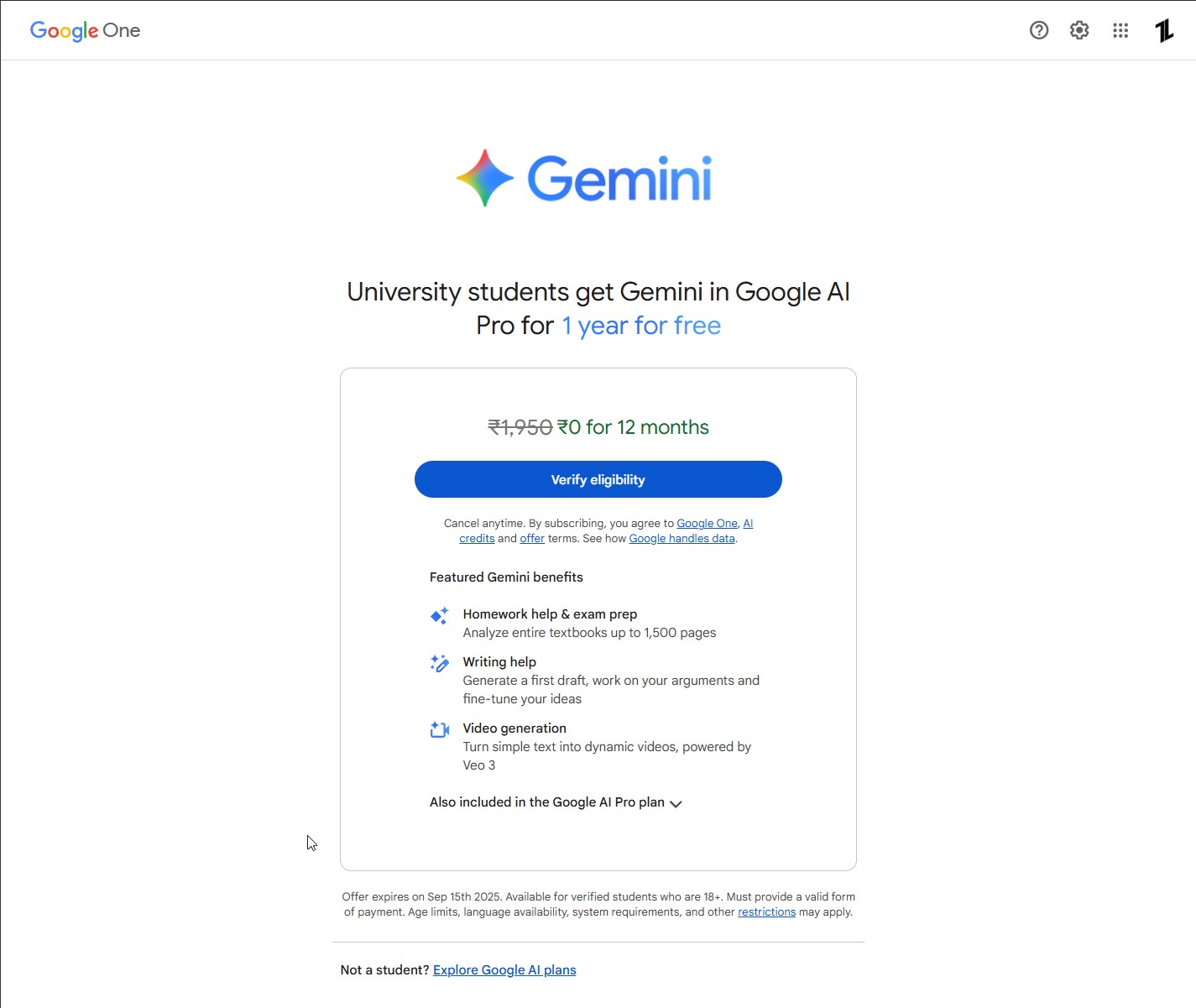
Once you’re on the page, you should see a clear call to action, usually a button that says “Get offer” or “Verify eligibility“. Click on it.
Step 4: ID Student Verification
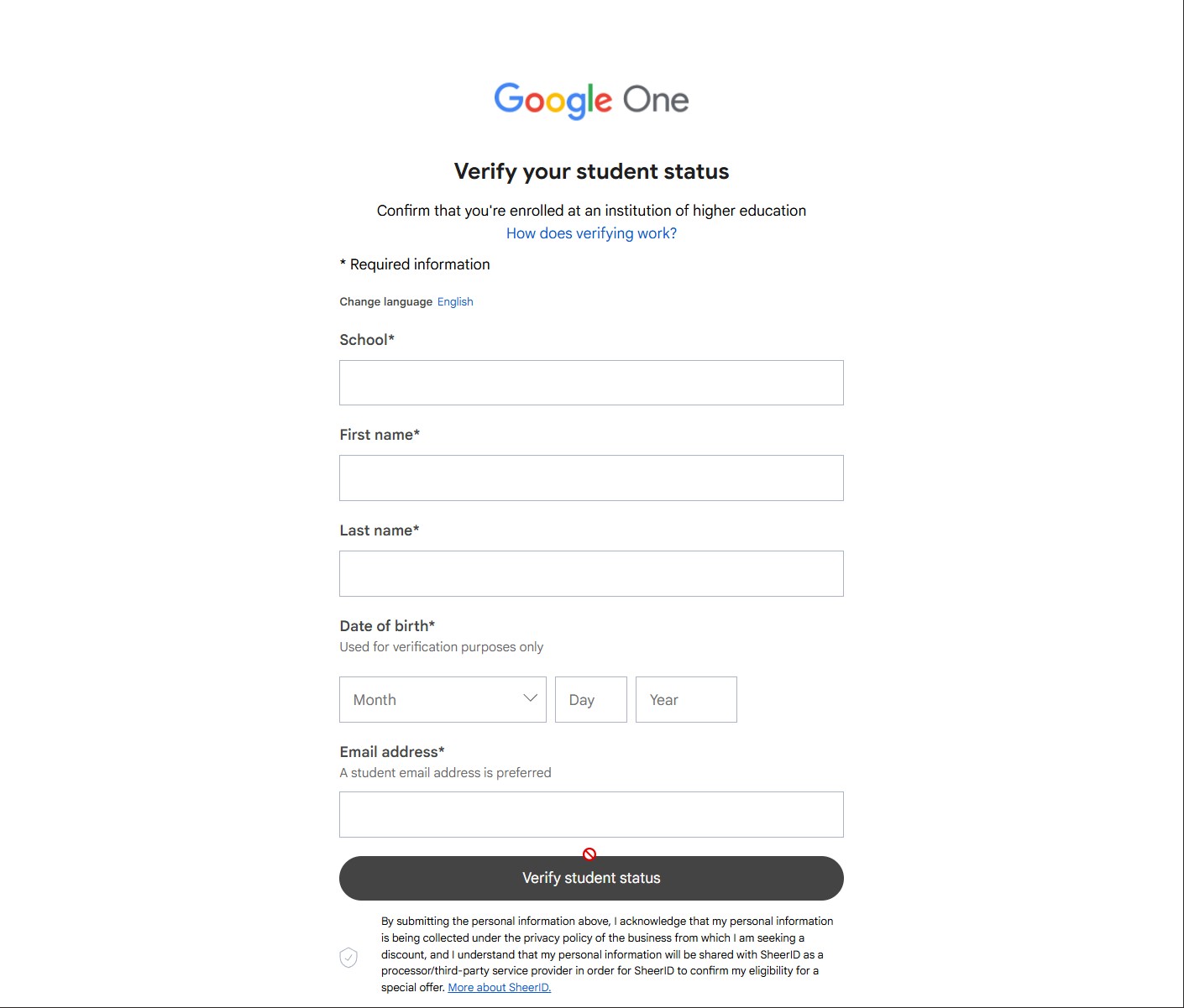
This is where the magic (and the verification) happens. Google partners with ID, a reputable third-party verification service, to confirm your student status. This ensures the offer goes to genuine students.
You will be redirected to an ID form or an integrated verification flow. Here’s what to expect and how to handle it:
- Enter Your Details:
- You’ll be asked to provide your full name (as it appears on your school records).
- Your college/university name (the full official name).
- Your date of birth.
- Your personal email address (the same Gmail account you’re using for the offer).
- Sometimes, a personal mobile number that can receive SMS.
- Choose Your Verification Method:
- Instant Verification (if available): ID might attempt to verify your enrollment electronically by matching your provided details with existing databases. If this works, it’s super fast!
- Document Upload (most common for India): If instant verification isn’t possible, you will be prompted to upload proof of enrollment. This is where your prepared document comes in handy.
- Click on the upload option.
- Select the clear photo or scan of your chosen document (e.g., college ID, tuition receipt, class schedule).
- Important Technical Tip: Ensure the document clearly shows:
- Your first and last name.
- The name of your college/university.
- A date indicating current enrollment (e.g., academic year, expiry date on ID).
- You can black out any sensitive information on your document that is not required for eligibility (like your address or specific financial details on a fee receipt), as long as the necessary information remains clear.
- Submit the document.
- Wait for Verification:
- ID states that automated checks can be very quick (sometimes within minutes).
- If you upload documents, it typically takes around 30 minutes to a few hours for manual review. In some cases, it might take up to 48 hours, but usually, it’s much faster.
- You’ll receive an email notification (check your spam folder too!) once your verification status is updated.
Step 5: Redeem Your Google AI Pro Membership
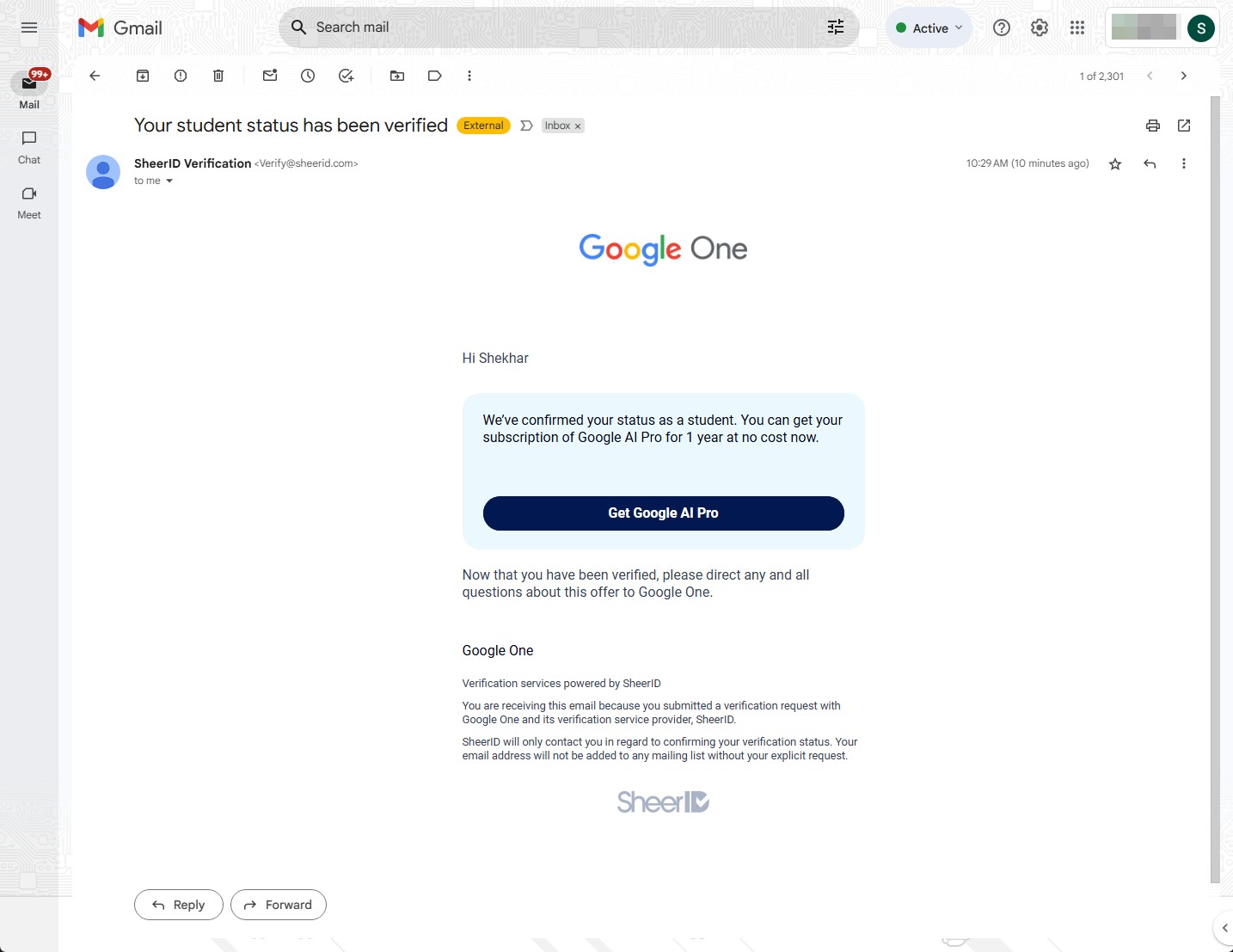
Once ID confirms your eligibility, you will be redirected back to the Google One page.
- Confirm the Offer: You’ll see a confirmation that you’ve been verified and are eligible for the 12-month free Google AI Pro plan.
- Add/Select Payment Method: You will be asked to select an existing payment method in your Google Payments profile or add a new one.
- Crucial Reminder: While a payment method is required, you will NOT be charged anything for the free 12 months. This is standard for trials and ensures continuity if you choose to continue the subscription after the free period.
- Google will send you reminder emails well before the free year ends, giving you ample time to decide if you want to continue paying or cancel the subscription.
- Complete the “Trial Purchase Flow”: Click on “Subscribe” or “Start Free Trial” to finalize the process.
Step 6: Start Using Your New AI Superpowers!
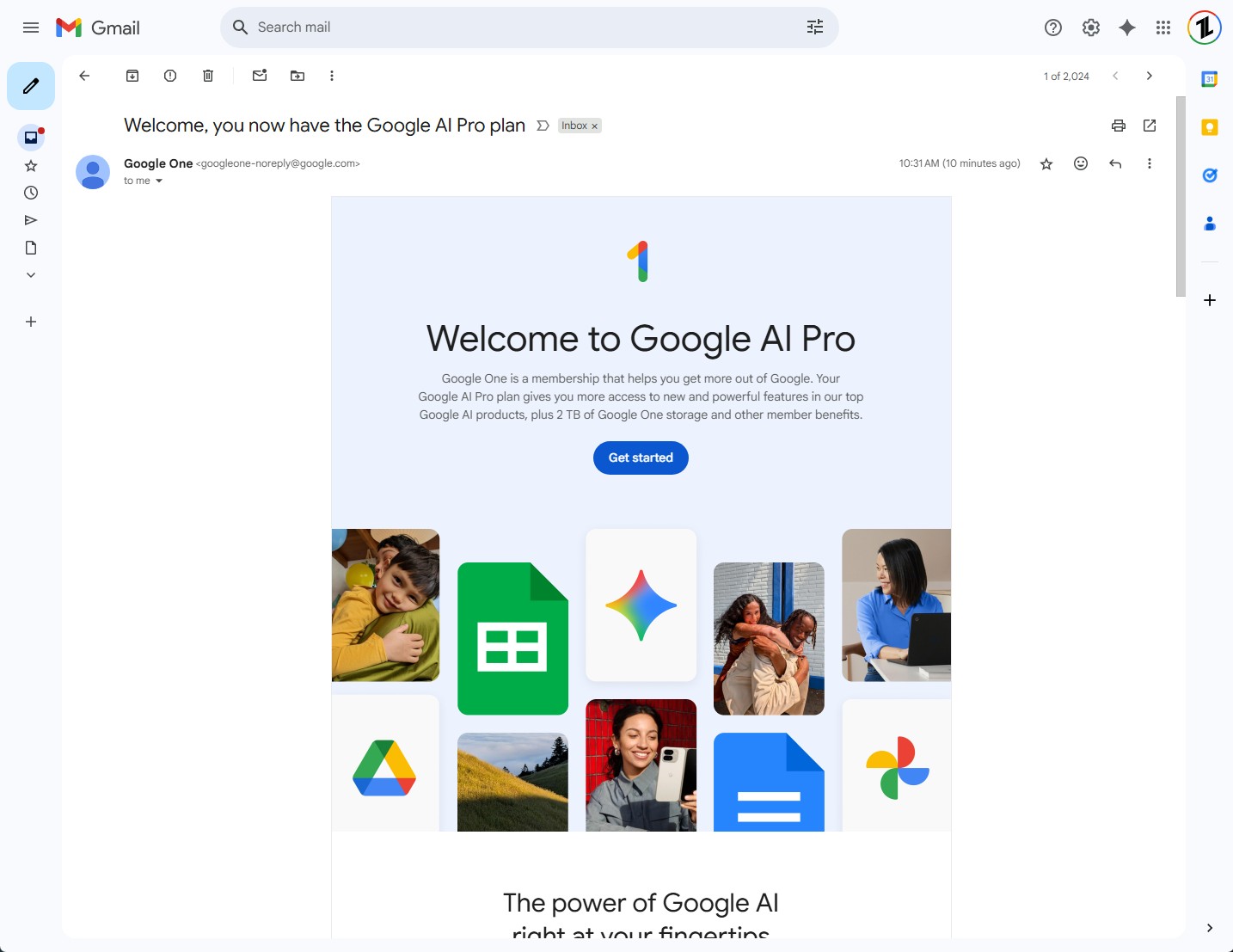
Congratulations! Once successfully subscribed, you can immediately start leveraging the power of Google AI Pro.
- Access Gemini 2.5 Pro: Go to
gemini.google.comor open the Gemini app on your mobile device. You’ll notice the enhanced capabilities immediately. - Explore Google One: Visit
one.google.comto manage your 2 TB cloud storage and other Google One benefits. - Integrated AI: Start using Gemini directly within Gmail, Google Docs, Sheets, and Slides. Look for the Gemini icon or contextual AI suggestions.
Why This Offer is a Game-Changer for Indian Students
This isn’t just about getting something for free; it’s about democratizing access to powerful AI tools that are shaping the future.
- Bridge the Digital Divide: For many students, premium AI tools might be financially out of reach. This offer levels the playing field, giving everyone access to technology.
- Enhance Learning & Productivity: From complex problem-solving to efficient research, creative writing, and data analysis, Gemini Pro can significantly boost your academic performance and reduce study stress.
- Future-Proofing Your Skills: AI is rapidly integrating into every industry. By familiarizing yourself with advanced AI tools now, you’re gaining invaluable experience that will be highly sought after in the job market. This is your chance to experiment and learn.
- Growing Creativity: With tools like Veo 3 Fast, you can bring your creative ideas to life in ways previously unimaginable, fostering a new generation of digital creators.
Important Considerations & Pro Tips
- Set a Reminder for Cancellation: If you don’t wish to continue with the paid subscription after the free year, set a reminder in your calendar for around 11 months from now. You can easily cancel your Google One subscription anytime before the free period ends to avoid being charged.
- Responsible AI Use: While Gemini Pro is incredibly powerful, remember that it’s a tool. Always double-check information for accuracy, especially for academic work. Use it to enhance your understanding and creativity, not to plagiarize.
- Troubleshooting:
- Verification Issues: If ID has trouble verifying your student status, they will usually send an email asking for additional documentation. Make sure the documents you provide are clear, valid, and contain all the required information. You can also contact ID customer service directly if you face persistent issues.
- Payment Method Issues: Ensure your payment method is valid and has sufficient funds if a small, temporary authorization charge is attempted (which is sometimes done to verify the card, but is immediately reversed).
- Active Google One Plan: If you already have a Google One plan and it’s preventing you from claiming the offer, consider if it’s worth cancelling your current plan to avail this offer, especially if your current plan is less beneficial.
- Spread the Word: This is a limited-time offer (until September 15, 2025). Share this information with your college friends and classmates so they don’t miss out on this incredible opportunity!
Wrapping It All
I can’t stress enough what an opportunity this is for every college student in India. Google is handing you the keys to some of the most advanced AI technology available, completely free, for an entire year.
This isn’t just about getting homework done faster; it’s about learning and preparing yourself for a future where AI fluency will be as essential as digital platforms grow.
Don’t let this chance slip away. Follow the steps, claim your free Gemini Pro, and start exploring the incredible possibilities it unlocks for your academic and personal growth. Thanks for staying up till the end.
Enjoyed this article?
If TechLatest has helped you, consider supporting us with a one-time tip on Ko-fi. Every contribution keeps our work free and independent.
Support on Ko-fiDirectly in Your Inbox